Aesthetic Wallpaper for Girls
- 4.9
- Rating
- 1.00M
- Installs
- Free
- Price
 Analysis by App-foxy
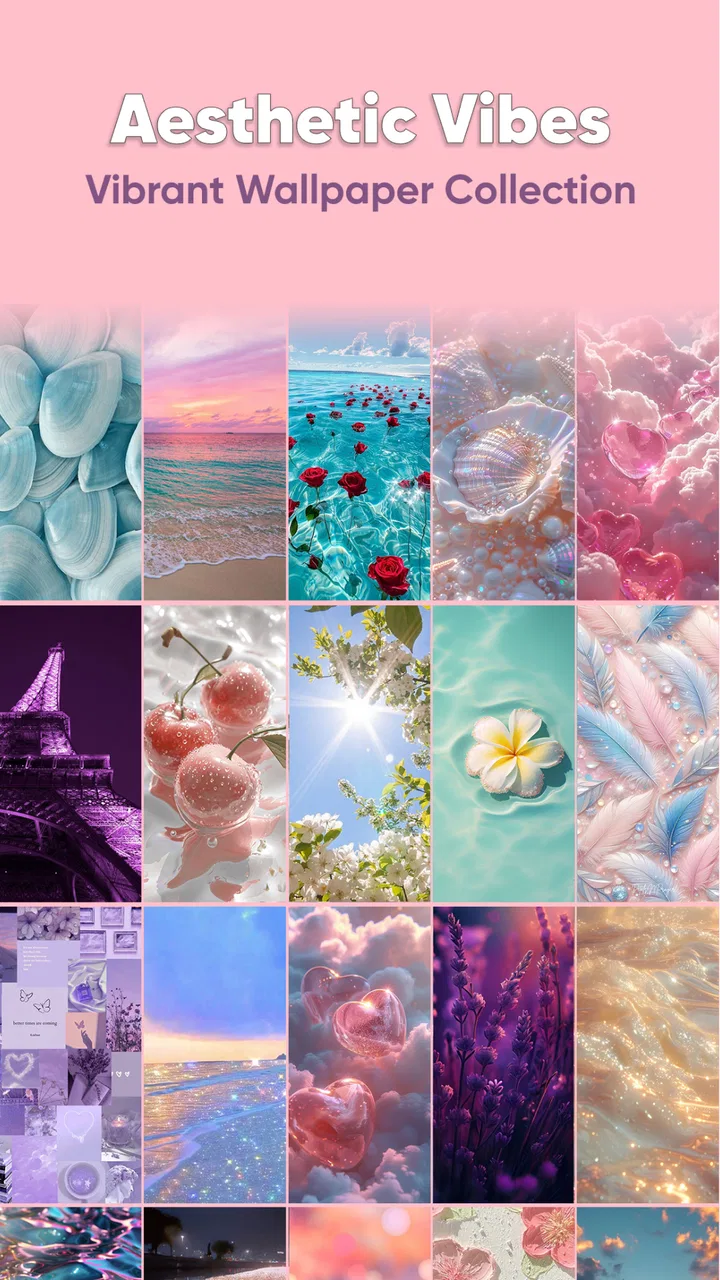
When I tried Aesthetic Wallpaper for Girls on a shared household phone, I understood its appeal quickly: it makes changing the screen feel more personal without turning the process into a complicated customization project. This is a free personalization app from DOSA Apps, focused on cute, feminine-looking backgrounds and visual styles. I would describe it as a browsing-and-refreshing tool for people who want their phone to feel softer, brighter, or more expressive than the default system wallpaper.
The app is listed as Aesthetic Wallpaper for Girls, although its store short description presents it simply as “Aesthetic Wallpaper.” That distinction matters because the experience is more about visual mood than technical phone customization. I did not approach it expecting widgets, a complete icon replacement system, or a launcher. Its strength is narrower: helping you find a background that matches your taste and giving an ordinary screen a quick change of personality.
How it works on a shared household device
A realistic use case is a family tablet or spare phone that moves between people during the day. One person may prefer pink illustrations and hearts, another may want a calm pastel image, while someone else may want something darker and less decorative. An app centered on wallpaper can make that small disagreement easier because changing the background is quick and reversible. Nobody has to permanently redesign the whole device just to make it feel comfortable for a few hours.
You May Also Like

 Blood Strike: 2.5 Anniversary
Blood Strike’s Loadouts Turn Every Drop Into a Tactical Gamble
A close look at Blood Strike’s custom loadouts: how fast access to signature weapons reshapes its battle royale rhythm, rewards preparation, and narrows the gap between fights.

 Pandora - Music & Podcasts
Pandora’s Music Is Easy to Start, but Harder to Recover
Pandora’s strength is its low-effort path from a seed to a station. Its weak spot is how much confidence it asks you to place in connection, setup, and quiet recovery.

 8 Ball Pool
 Is Built on Rivalries, Rematches, and Routine
A close look at the rivalries, rematches, shared routines, and unanswered safety questions that turn a quick pool match into a persistent mobile community.

 Samsung Music
’s Quiet Strength Is Playing What You Already Own
Its reach comes less from spectacle than from dependable access to a personal library. That simplicity is both the app’s strongest retention engine and its ceiling.

 AccuWeather: Weather Radar
AccuWeather Review: A Quick, Clear Forecast for Everyday Decisions
For everyday plans, the best forecast is the one you can understand quickly. AccuWeather makes rain timing, radar, and local conditions easy to act on, with a few trade-offs.

 Hill Climb Racing
Why Hill Climb Racing Still Turns Crashes Into One More Run
A tiny car, a bumpy hill and one more upgrade: Hill Climb Racing keeps resurfacing because its simple chaos makes every near-miss feel personal.
More From Our News Desk



I also found that this kind of app works well for a personal phone used in different settings. You might choose a playful background at home, then switch to something quieter before a class, work shift, or appointment. The useful habit is to treat the wallpaper as a visual signal rather than a permanent decision. If you share a device, agree on a simple rule: the person using it can change the background, but should leave the phone tidy for the next user.
That sounds minor, but it prevents a common problem with shared screens. A child may choose a very bright design, while an adult using the same device later may find it distracting. A teenager may want a strongly themed image, while a younger sibling may prefer something cheerful. The app does not solve those household preferences for you, but its focused purpose makes the compromise easy: browse, choose, apply, and change it again when the user changes.
My main advice is to judge the app by that modest role. It is not a replacement for a full personalization suite. If your priority is arranging icons, building elaborate home-screen layouts, or matching several system elements automatically, you will probably need other tools. If you mainly want a collection of cute and girly-looking backgrounds without searching through unrelated design resources, this app is much more on target.
Start with a clear visual boundary
On a shared phone, I would decide first whether the wallpaper should be used on the home screen, the lock screen, or both. The practical reason is privacy and readability. A busy image behind icons can make labels harder to read, while a detailed lock-screen design can compete with notifications and the clock. Even when the app offers an attractive image, the best choice is not always the most decorative one.
I recommend checking the image after it is applied rather than judging it only in the browsing view. A wallpaper can look balanced on its own but feel crowded once icons, folders, and status information sit on top of it. For a household device, a softer background with open space is often more successful than a highly detailed design. It gives every user a cleaner starting point and reduces the temptation to rearrange the whole screen.
Another useful boundary is deciding who is allowed to make changes. This is not a claim that the app provides family controls or separate user profiles; it does not turn the wallpaper into an account-management system. The boundary has to come from the household. On a shared tablet, I would let younger users choose from a small set of already-approved images, then let an adult handle the final application if the device is also used for school, appointments, or work.
That approach keeps the app enjoyable without pretending that visual customization is the same as device administration. There is no reason to give a wallpaper app responsibility for permissions, accounts, purchases, or personal files. Keep those decisions in the device settings and household rules. Use this app only for the screen’s appearance.
Coordinating choices without losing the personal feel
The easiest way to coordinate is to separate the selection stage from the application stage. I would let each regular user browse and identify a favorite, then compare the choices on the actual device. This catches problems that are easy to miss at first glance, such as an image that hides app names or makes a lock-screen clock difficult to read.
For couples or roommates sharing a tablet, taking turns is more practical than trying to find one design that represents everyone. A weekly or occasional rotation keeps the screen fresh and avoids making one person feel that their taste always loses. For a child and parent sharing a device, the parent can choose a neutral background for school or travel, while the child can select a more playful one for personal use when appropriate.
The app’s free entry point also makes this experimentation less intimidating. You can try the visual style before deciding whether it deserves a permanent place on the device. There are in-app purchases ranging from less than a dollar to nearly a hundred dollars per item, so I would pay attention during any purchase flow and avoid treating every appealing option as automatically free. A child using a shared device should not be the person making those purchase decisions.
This is one of the less obvious trade-offs of a wallpaper catalog: the browsing experience can encourage impulse choices. My workflow is to shortlist a few images, leave the screen for a moment, and then return to the one that still looks useful behind the icons. That small pause is especially helpful on a shared device, where a decorative choice can affect several people rather than just the person holding the phone.
Age context and trust matter more than the theme
The app carries an Everyone content rating, which makes its general positioning approachable for a broad audience. Still, an age label should not replace normal supervision on a shared phone. The important questions are practical: who is using the device, who can approve purchases, and who is responsible for applying changes? Those are household decisions, not features I would assume from a wallpaper app.
For younger users, I would explain that selecting a background is harmless but that tapping purchase buttons is different. The free app can be explored together, and an adult can remain nearby if the device has payment details attached. This is not because the wallpaper concept is complicated; it is because shared devices blur the line between casual browsing and account activity.
For older children and teenagers, the app can be a simple way to express style without opening access to more sensitive customization tools. They can choose a background that feels personal while the household keeps separate rules for accounts, downloads, and spending. I like that division because it gives young users a visible form of ownership without handing over control of the entire device.
Adults should also remember that “girly” is a style direction, not a requirement. The catalog may appeal strongly to people who enjoy cute, pastel, romantic, or decorative visuals, but someone looking for photography, minimalist textures, landscapes, or highly technical AMOLED-focused backgrounds may feel restricted. A user should not be pushed toward this app merely because they want a new wallpaper. The fit depends on taste.
What I noticed during everyday use
The strongest part of the experience is its focused identity. Instead of making me sort through every kind of image, it points toward a recognizable aesthetic. That is useful when I already know the mood I want: soft colors, playful motifs, feminine decoration, or a screen that feels more cheerful. The app’s store summary describes cute and girly backgrounds, and that promise matches the reason I would open it.
The weaker side is the same focus. A narrow visual identity can become repetitive if you change wallpapers often or if your preferences shift from cute designs to neutral ones. I would not install it as my only source of backgrounds if I regularly want variety across photography, art, abstract patterns, and system-friendly minimal designs. A broader wallpaper service would be better for that purpose.
Another trade-off is the difference between an image that looks attractive in a preview and one that remains comfortable every day. Very bright pinks, dense patterns, or large decorative elements may be fun initially but tiring behind frequently used icons. I prefer to use the more detailed options on a lock screen or a secondary device, while choosing calmer designs for a phone I check constantly.
It is also worth considering the phone’s existing layout. If your icons already occupy most of the home screen, a wallpaper with a strong central subject may be hidden or visually chopped up. Before applying a favorite, I would look at where the icons sit and choose an image whose important details remain visible around them. This is a simple adjustment, but it makes the final result look more intentional.
How it compares with the usual alternatives
Compared with searching images through a general web browser, this app is more convenient for someone who already wants an aesthetic wallpaper rather than a random picture. The search engine offers enormous variety, but it also creates extra work: checking image quality, finding a suitable crop, and deciding whether the source is appropriate for a shared device. A focused app reduces that decision fatigue.
Compared with the wallpaper tools built into Android or iOS, this app offers a more specific mood. The system picker is usually the safer choice when you want dependable integration, understated designs, or manufacturer-curated options. It is also the better starting point for someone who dislikes decorative themes. Aesthetic Wallpaper for Girls makes more sense when the built-in choices feel too plain or do not reflect your preferred style.
Compared with a full launcher or icon-pack setup, this app is much lighter. That is a benefit if you want a quick visual refresh without learning a new home-screen system. It is a limitation if you want the icons, widgets, folders, and wallpaper to form one coordinated theme. I would choose this app for a low-effort change and a launcher-based solution for a complete redesign.
Finally, compared with generic wallpaper collections, its value depends on how closely the catalog matches your taste. The high average rating of 4.9, based on around twenty-three thousand ratings, suggests that its intended audience responds well to the concept. It has also passed one million installs, so it is not an obscure experiment. Those figures are encouraging, but they do not remove the need to check whether the actual visual style suits you.
Device fit, cost, and practical expectations
The app supports Android devices running version 8.0 or later, which covers many phones and tablets still in everyday use. I would check the operating system before recommending it for an older spare device, particularly one kept for children or guests. Compatibility is most useful when it helps a household reuse an existing phone instead of buying another device simply for a nicer screen.
It is free to install, which makes trying it straightforward. At the same time, the presence of individual in-app purchases means I would not describe every possible choice as cost-free. The listed purchase range runs from $0.99 to $99.99 per item, a wide span that deserves attention if several people browse on the same account. Disable or protect purchase access through the device’s normal account settings when children use the phone.
The current version is 8.1.0, and the app was released on May 24, 2021. I mention that context because a mature app can feel more settled than a brand-new one, but it can also reflect an older approach to customization. I would keep expectations realistic: the core value is the wallpaper browsing experience, not a promise of modern, all-in-one home-screen management.
DOSA Apps is the developer behind it, and the app’s identity is clear enough that I would know why I was installing it. That clarity is important in a crowded category. I do not need a wallpaper app to explain every aspect of my phone; I need it to help me make a good visual choice quickly and apply it without unnecessary complexity.
Who should use it, and who should skip it
I would recommend it to someone who enjoys cute, feminine, pastel, or decorative backgrounds and wants a quick way to refresh a phone or tablet. It is especially suitable for a personal device where the owner can choose freely, or for a shared household device where people are comfortable taking turns with the screen’s appearance.
It can also suit parents and older children who want a small, supervised form of customization. The child gets to express a preference, while the adult keeps responsibility for account boundaries and purchases. That arrangement works best when everyone understands that the wallpaper is personal decoration, not a separate private profile.
I would skip it if you want live wallpapers, elaborate widgets, automatic theme synchronization, professional photography, or a large collection of unrelated visual categories. I would also look elsewhere if you need strict family-management features. This app should not be treated as a solution for controlling who can access a device or what each person can do on it.
People who prefer minimal screens may find the catalog too sweet or visually busy. In that case, the Android or iOS wallpaper picker, a photography collection, or a minimalist background app would probably be a better match. The most honest recommendation is conditional: install this one when its aesthetic is the reason you are searching, not simply because you need any wallpaper.
My household verdict
After using it as a focused personalization tool, I see Aesthetic Wallpaper for Girls as an easy, approachable choice for refreshing a screen with a cute and clearly defined style. Its best quality is not technical depth; it is the speed with which it turns a plain device into something that feels more like its owner. That makes it useful on a personal phone and surprisingly practical on a shared tablet when the household agrees on simple boundaries.
I would introduce it to a shared device by choosing a few candidates together, checking how each one looks behind the icons, and keeping purchase decisions with the account owner. That workflow avoids the most common friction: unreadable screens, accidental spending, and arguments over who changed the background last. It also respects the difference between visual expression and real account control.
The app is free to try, rated for Everyone, and backed by a large user base, but its appeal remains taste-specific. I would not call it a universal wallpaper solution. I would call it a focused catalog for people who want a soft, playful, girly look and prefer a simple change over a complete phone redesign.
My final recommendation is straightforward: choose it if you want cute aesthetic backgrounds and a low-effort screen refresh; choose the built-in system tools or a broader alternative if your priorities are minimalism, variety, advanced customization, or household management. Used within those limits, it does its job well and gives shared devices a little more personality without making them harder to use.
FAQs for Aesthetic Wallpaper for Girls
01What features does Aesthetic Wallpaper for Girls offer?
Aesthetic Wallpaper for Girls offers a wide variety of high-quality wallpapers, including themes like pastel, vintage, and minimalist designs. Users can easily browse categories, save favorites, and set wallpapers directly from the app. Additionally, it provides daily updates to ensure fresh content and supports different screen resolutions for optimal display.
02Is Aesthetic Wallpaper for Girls free to use?
The app is free to download and use, but it may contain in-app purchases. These purchases typically provide access to premium wallpapers or an ad-free experience. Users can enjoy a wide selection of free wallpapers, but opting for premium options can enhance the overall user experience.
03How often is new content added to Aesthetic Wallpaper for Girls?
New wallpapers are added daily, ensuring users always have fresh options to choose from. The app developers are committed to maintaining a constantly updated library with trending designs and seasonal collections, making it easy for users to keep their screens looking stylish and current.
04Can I customize wallpapers within the app?
While Aesthetic Wallpaper for Girls primarily provides ready-to-use wallpapers, some versions may include basic customization options like cropping or resizing. However, for extensive customization, users might need to use additional photo editing apps to tailor the wallpapers to their specific preferences.
05Is Aesthetic Wallpaper for Girls compatible with all devices?
The app is designed to work on most Android and iOS devices. It supports various screen resolutions and aspect ratios, ensuring that wallpapers look great on both smartphones and tablets. However, it's always a good idea to check device compatibility in the app store before downloading.
Pros
- Wide variety of unique designs.
- High-resolution wallpapers available.
- User-friendly interface.
- Regular updates with new content.
- Easy download and apply options.
Cons
- Contains frequent ads.
- Limited free content.
- No offline access to wallpapers.
- Some designs are repetitive.
- Requires in-app purchases for full access.

Aesthetic Wallpaper for Girls
Gallery